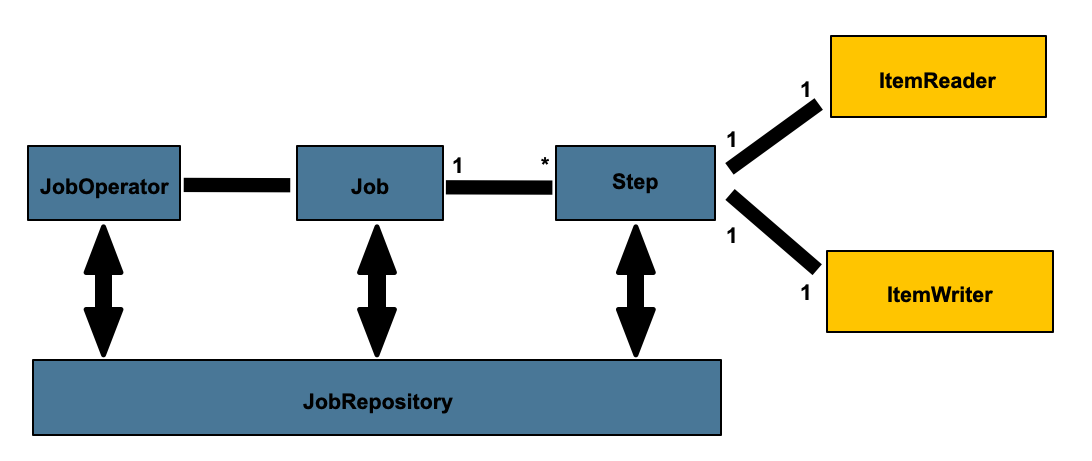
Reader, Processor, Writer를 활용한 실무 배치 개발을 다뤄보겠습니다.
Sample Code
이 시리즈에서 다루는 전체 예제 코드는 GitHub에서 확인할 수 있습니다.
spring-batch-sample
시리즈 목차
이 글에서 다룰 내용
- 실제 이메일 발송 배치 구현
- Reader/Processor/Writer 상세 분석
- 성공/실패 처리 및 상태 업데이트
- Skip과 Retry 전략
- 트랜잭션 관리
- 테스트 및 디버깅
구현할 배치 시스템 아키텍처
전체 흐름도
flowchart TB
    subgraph Job["Email Send Batch Job"]
        subgraph Step["Email Send Step"]
            subgraph Chunk["Chunk (1000건씩 처리)"]
                Reader["Reader<br/>DB에서 PENDING 상태 이메일 조회"]
                Processor["Processor<br/>이메일 주소 검증<br/>EmailService.send() 호출<br/>성공/실패 상태 설정"]
                Writer["Writer<br/>발송 결과를 DB에 Batch Update"]
                Commit["COMMIT"]
                Reader --> Processor --> Writer --> Commit
            end
        end
    end
프로젝트 구조
1
2
3
4
5
6
7
8
9
10
11
12
13
14
| src/main/java/com/example/batch/
├── job/
│ ├── EmailSendJobConfiguration.java # Job 설정
│ └── listener/
│ └── EmailJobExecutionListener.java # Job 리스너
├── entity/
│ └── Email.java # 이메일 엔티티
├── repository/
│ └── EmailRepository.java # JPA Repository
├── service/
│ ├── EmailService.java # 이메일 발송 서비스
│ └── EmailValidator.java # 이메일 검증
└── dto/
└── EmailSendResult.java # 발송 결과 DTO
|
단계별 구현
1단계: Entity 및 Repository
Email.java
1
2
3
4
5
6
7
8
9
10
11
12
13
14
15
16
17
18
19
20
21
22
23
24
25
26
27
28
29
30
31
32
33
34
35
36
37
38
39
40
41
42
43
44
45
46
47
48
49
50
51
52
53
54
55
56
57
58
59
60
61
62
63
64
65
66
67
68
69
70
71
72
73
74
75
76
77
78
79
80
81
82
83
| package com.example.batch.entity;
import jakarta.persistence.*;
import lombok.*;
import java.time.LocalDateTime;
@Entity
@Table(name = "email_send_queue")
@Getter
@Setter
@NoArgsConstructor
@AllArgsConstructor
@Builder
public class Email {
@Id
@GeneratedValue(strategy = GenerationType.IDENTITY)
private Long id;
@Column(name = "to_email", nullable = false)
private String toEmail;
@Column(nullable = false)
private String subject;
@Column(nullable = false, columnDefinition = "TEXT")
private String content;
@Column(nullable = false, length = 20)
@Enumerated(EnumType.STRING)
private EmailStatus status = EmailStatus.PENDING;
@Column(name = "sent_at")
private LocalDateTime sentAt;
@Column(name = "error_message", columnDefinition = "TEXT")
private String errorMessage;
@Column(name = "retry_count")
private Integer retryCount = 0;
@Column(name = "created_at", nullable = false, updatable = false)
private LocalDateTime createdAt;
@Column(name = "updated_at")
private LocalDateTime updatedAt;
@PrePersist
protected void onCreate() {
createdAt = LocalDateTime.now();
updatedAt = LocalDateTime.now();
}
@PreUpdate
protected void onUpdate() {
updatedAt = LocalDateTime.now();
}
/**
* 발송 성공 처리
*/
public void markAsSent() {
this.status = EmailStatus.SUCCESS;
this.sentAt = LocalDateTime.now();
this.errorMessage = null;
}
/**
* 발송 실패 처리
*/
public void markAsFailed(String errorMessage) {
this.status = EmailStatus.FAILED;
this.errorMessage = errorMessage;
this.retryCount++;
}
/**
* 재시도 가능 여부
*/
public boolean canRetry() {
return this.retryCount < 3;
}
}
|
EmailStatus.java
1
2
3
4
5
6
7
| package com.example.batch.entity;
public enum EmailStatus {
PENDING, // 대기 중
SUCCESS, // 발송 성공
FAILED // 발송 실패
}
|
EmailRepository.java
1
2
3
4
5
6
7
8
9
10
11
12
13
14
15
16
17
18
19
20
21
22
23
24
25
26
27
28
| package com.example.batch.repository;
import com.example.batch.entity.Email;
import com.example.batch.entity.EmailStatus;
import org.springframework.data.jpa.repository.JpaRepository;
import org.springframework.data.jpa.repository.Query;
import java.time.LocalDateTime;
import java.util.List;
public interface EmailRepository extends JpaRepository<Email, Long> {
/**
* PENDING 상태의 이메일 조회
*/
List<Email> findByStatusOrderByIdAsc(EmailStatus status);
/**
* 특정 기간 동안의 발송 통계
*/
@Query("""
SELECT e.status, COUNT(e)
FROM Email e
WHERE e.sentAt BETWEEN :startDate AND :endDate
GROUP BY e.status
""")
List<Object[]> getStatistics(LocalDateTime startDate, LocalDateTime endDate);
}
|
2단계: 이메일 발송 서비스
EmailService.java
1
2
3
4
5
6
7
8
9
10
11
12
13
14
15
16
17
18
19
20
21
22
23
24
25
26
27
28
29
30
31
32
33
34
35
36
37
38
39
40
41
42
43
44
45
46
47
48
49
50
51
52
53
54
55
56
57
58
59
60
61
62
63
64
65
66
67
68
69
70
71
72
73
74
| package com.example.batch.service;
import lombok.extern.slf4j.Slf4j;
import org.springframework.stereotype.Service;
import java.util.concurrent.TimeUnit;
/**
* 이메일 발송 서비스 (시뮬레이션)
*/
@Slf4j
@Service
public class EmailService {
private static final double SUCCESS_RATE = 0.9; // 90% 성공률
/**
* 이메일 발송
*
* @return true: 성공, false: 실패
* @throws IllegalArgumentException 잘못된 이메일 주소
* @throws EmailSendException 발송 실패
*/
public boolean send(String toEmail, String subject, String content) {
log.debug("Sending email to: {}, subject: {}", toEmail, subject);
// 1. 이메일 주소 검증
validateEmail(toEmail);
// 2. 네트워크 지연 시뮬레이션 (10~50ms)
simulateNetworkDelay();
// 3. 랜덤 실패 시뮬레이션 (10% 확률)
if (Math.random() > SUCCESS_RATE) {
log.warn("Failed to send email to: {} (simulated failure)", toEmail);
throw new EmailSendException("SMTP connection timeout");
}
log.debug("Email sent successfully to: {}", toEmail);
return true;
}
/**
* 이메일 주소 검증
*/
private void validateEmail(String email) {
if (email == null || email.isBlank()) {
throw new IllegalArgumentException("Email address cannot be empty");
}
// "invalid"가 포함된 이메일은 무조건 실패
if (email.contains("invalid")) {
throw new IllegalArgumentException("Invalid email address: " + email);
}
// 기본 형식 검증
if (!email.matches("^[A-Za-z0-9+_.-]+@[A-Za-z0-9.-]+\\.[A-Za-z]{2,}$")) {
throw new IllegalArgumentException("Invalid email format: " + email);
}
}
/**
* 네트워크 지연 시뮬레이션
*/
private void simulateNetworkDelay() {
try {
long delay = 10 + (long) (Math.random() * 40); // 10~50ms
TimeUnit.MILLISECONDS.sleep(delay);
} catch (InterruptedException e) {
Thread.currentThread().interrupt();
throw new EmailSendException("Email sending interrupted", e);
}
}
}
|
EmailSendException.java
1
2
3
4
5
6
7
8
9
10
11
12
13
14
15
| package com.example.batch.service;
/**
* 이메일 발송 실패 예외
*/
public class EmailSendException extends RuntimeException {
public EmailSendException(String message) {
super(message);
}
public EmailSendException(String message, Throwable cause) {
super(message, cause);
}
}
|
3단계: Reader 구현
ItemReader 방식 비교
Spring Batch는 여러 종류의 Reader를 제공합니다.
| Reader | 특징 | 사용 시기 |
|---|
| JpaPagingItemReader | JPA 페이징 조회 | 복잡한 조건, 엔티티 그래프 |
| JdbcPagingItemReader | JDBC 페이징 조회 | 단순 조회, 성능 중요 |
| JdbcCursorItemReader | JDBC 커서 기반 | 대용량, 스트리밍 |
| RepositoryItemReader | Spring Data Repository | 기존 Repository 재사용 |
이 예제에서는 JpaPagingItemReader를 사용하겠습니다.
EmailItemReader 설정
1
2
3
4
5
6
7
8
9
10
11
12
13
14
15
16
17
18
19
20
21
22
23
24
25
26
27
28
29
30
31
32
33
34
35
36
37
| package com.example.batch.job;
import com.example.batch.entity.Email;
import com.example.batch.entity.EmailStatus;
import jakarta.persistence.EntityManagerFactory;
import lombok.RequiredArgsConstructor;
import lombok.extern.slf4j.Slf4j;
import org.springframework.batch.item.database.JpaPagingItemReader;
import org.springframework.batch.item.database.builder.JpaPagingItemReaderBuilder;
import org.springframework.context.annotation.Bean;
import org.springframework.context.annotation.Configuration;
import java.util.Map;
@Slf4j
@Configuration
@RequiredArgsConstructor
public class EmailItemReaderConfig {
private final EntityManagerFactory entityManagerFactory;
/**
* 이메일 Reader
*
* pageSize: 한 번에 읽어올 데이터 개수
*/
@Bean
public JpaPagingItemReader<Email> emailItemReader() {
return new JpaPagingItemReaderBuilder<Email>()
.name("emailItemReader")
.entityManagerFactory(entityManagerFactory)
.queryString("SELECT e FROM Email e WHERE e.status = :status ORDER BY e.id ASC")
.parameterValues(Map.of("status", EmailStatus.PENDING))
.pageSize(1000) // fetch-size
.build();
}
}
|
Reader 동작 원리
sequenceDiagram
    participant Reader
    participant DB

    Note over Reader,DB: 1차 조회 (Page 0)
    Reader->>DB: SELECT ... LIMIT 1000 OFFSET 0
    DB-->>Reader: [Email 1~1000]

    loop 1000번 호출
        Reader->>Reader: read() → 1건씩 반환
    end

    Note over Reader,DB: 2차 조회 (Page 1)
    Reader->>DB: SELECT ... LIMIT 1000 OFFSET 1000
    DB-->>Reader: [Email 1001~2000]
핵심 포인트를 정리하면 다음과 같습니다.
pageSize만큼 한 번에 조회 (네트워크 왕복 최소화)read() 메서드는 1건씩 반환 (메모리 효율적)ORDER BY 필수 (일관된 순서 보장)
4단계: Processor 구현
EmailItemProcessor.java
1
2
3
4
5
6
7
8
9
10
11
12
13
14
15
16
17
18
19
20
21
22
23
24
25
26
27
28
29
30
31
32
33
34
35
36
37
38
39
40
41
42
43
44
45
46
47
48
49
50
51
52
53
54
55
56
57
58
59
60
61
| package com.example.batch.job;
import com.example.batch.entity.Email;
import com.example.batch.service.EmailSendException;
import com.example.batch.service.EmailService;
import lombok.RequiredArgsConstructor;
import lombok.extern.slf4j.Slf4j;
import org.springframework.batch.item.ItemProcessor;
import org.springframework.stereotype.Component;
/**
* 이메일 발송 Processor
*/
@Slf4j
@Component
@RequiredArgsConstructor
public class EmailItemProcessor implements ItemProcessor<Email, Email> {
private final EmailService emailService;
@Override
public Email process(Email email) throws Exception {
log.debug("Processing email: id={}, to={}", email.getId(), email.getToEmail());
try {
// 1. 이메일 발송 시도
emailService.send(
email.getToEmail(),
email.getSubject(),
email.getContent()
);
// 2. 성공 처리
email.markAsSent();
log.info("Email sent successfully: id={}, to={}",
email.getId(), email.getToEmail());
return email;
} catch (IllegalArgumentException e) {
// 3. 검증 실패 (Skip 대상)
log.warn("Invalid email address: id={}, to={}, error={}",
email.getId(), email.getToEmail(), e.getMessage());
email.markAsFailed("Invalid email: " + e.getMessage());
// null 반환 = Writer에 전달하지 않음 = Skip
return null;
} catch (EmailSendException e) {
// 4. 발송 실패 (Retry 또는 Skip)
log.error("Failed to send email: id={}, to={}, error={}",
email.getId(), email.getToEmail(), e.getMessage());
email.markAsFailed(e.getMessage());
// 예외 던지기 = Skip 정책에 따라 처리
throw e;
}
}
}
|
Processor 처리 흐름도
flowchart TD
    Input["Email 객체 입력"]
    Send["emailService.send()"]
    Success{"성공?"}
    MarkSent["email.markAsSent()"]
    ReturnEmail["return email → Writer로 전달"]
    Invalid{"검증 실패?<br/>(IllegalArgumentException)"}
    MarkFailed1["email.markAsFailed()"]
    ReturnNull["return null → Skip"]
    SendFail{"발송 실패?<br/>(EmailSendException)"}
    MarkFailed2["email.markAsFailed()"]
    ThrowEx["throw e → Skip 정책 적용"]

    Input --> Send
    Send --> Success
    Success -->|Yes| MarkSent --> ReturnEmail
    Success -->|No| Invalid
    Invalid -->|Yes| MarkFailed1 --> ReturnNull
    Invalid -->|No| SendFail
    SendFail -->|Yes| MarkFailed2 --> ThrowEx
핵심 개념을 정리해보겠습니다.
return email: 정상 처리 → Writer로 전달return null: Skip → Writer로 전달 안 함throw Exception: Skip 또는 Retry 정책 적용
5단계: Writer 구현
EmailItemWriter.java
1
2
3
4
5
6
7
8
9
10
11
12
13
14
15
16
17
18
19
20
21
22
23
24
25
26
27
28
29
30
31
32
33
34
35
36
37
38
39
40
| package com.example.batch.job;
import com.example.batch.entity.Email;
import lombok.RequiredArgsConstructor;
import lombok.extern.slf4j.Slf4j;
import org.springframework.batch.item.Chunk;
import org.springframework.batch.item.ItemWriter;
import org.springframework.stereotype.Component;
import org.springframework.transaction.annotation.Transactional;
import jakarta.persistence.EntityManager;
/**
* 이메일 발송 결과 저장 Writer
*/
@Slf4j
@Component
@RequiredArgsConstructor
public class EmailItemWriter implements ItemWriter<Email> {
private final EntityManager entityManager;
@Override
@Transactional
public void write(Chunk<? extends Email> chunk) throws Exception {
long startTime = System.currentTimeMillis();
for (Email email : chunk.getItems()) {
// JPA merge로 업데이트
entityManager.merge(email);
}
// Batch flush
entityManager.flush();
entityManager.clear();
long elapsed = System.currentTimeMillis() - startTime;
log.info("Updated {} emails in {}ms", chunk.size(), elapsed);
}
}
|
Writer 동작 원리
sequenceDiagram
    participant Writer
    participant EntityManager
    participant DB

    Note over Writer: Chunk<Email> items (1000건)

    loop 1000번
        Writer->>EntityManager: merge(email)
        Note over EntityManager: UPDATE SQL 생성 (실행 X)
    end

    Writer->>EntityManager: flush()
    EntityManager->>DB: Hibernate Batch Update<br/>UPDATE ... WHERE id IN (?, ?, ...)
    Note over DB: 1000건 한 번에 실행

    Writer->>EntityManager: clear()
    Note over EntityManager: 영속성 컨텍스트 초기화

    Note over Writer: COMMIT
성능 최적화 포인트입니다.
entityManager.flush(): Batch Update 강제 실행entityManager.clear(): 메모리 해제- Hibernate의
batch_size 설정 활용
6단계: Job Configuration
EmailSendJobConfiguration.java
1
2
3
4
5
6
7
8
9
10
11
12
13
14
15
16
17
18
19
20
21
22
23
24
25
26
27
28
29
30
31
32
33
34
35
36
37
38
39
40
41
42
43
44
45
46
47
48
49
50
51
52
53
54
55
56
57
58
| package com.example.batch.job;
import com.example.batch.entity.Email;
import lombok.RequiredArgsConstructor;
import lombok.extern.slf4j.Slf4j;
import org.springframework.batch.core.Job;
import org.springframework.batch.core.Step;
import org.springframework.batch.core.job.builder.JobBuilder;
import org.springframework.batch.core.repository.JobRepository;
import org.springframework.batch.core.step.builder.StepBuilder;
import org.springframework.batch.item.ItemProcessor;
import org.springframework.batch.item.ItemReader;
import org.springframework.batch.item.ItemWriter;
import org.springframework.context.annotation.Bean;
import org.springframework.context.annotation.Configuration;
import org.springframework.transaction.PlatformTransactionManager;
@Slf4j
@Configuration
@RequiredArgsConstructor
public class EmailSendJobConfiguration {
private final JobRepository jobRepository;
private final PlatformTransactionManager transactionManager;
private static final int CHUNK_SIZE = 1000;
private static final int SKIP_LIMIT = 100;
/**
* Job 정의
*/
@Bean
public Job emailSendJob(Step emailSendStep) {
return new JobBuilder("emailSendJob", jobRepository)
.start(emailSendStep)
.build();
}
/**
* Step 정의
*/
@Bean
public Step emailSendStep(
ItemReader<Email> emailItemReader,
ItemProcessor<Email, Email> emailItemProcessor,
ItemWriter<Email> emailItemWriter
) {
return new StepBuilder("emailSendStep", jobRepository)
.<Email, Email>chunk(CHUNK_SIZE, transactionManager)
.reader(emailItemReader)
.processor(emailItemProcessor)
.writer(emailItemWriter)
.faultTolerant() // 에러 허용 활성화
.skip(Exception.class) // 모든 예외 Skip 대상
.skipLimit(SKIP_LIMIT) // 최대 100건까지 Skip 허용
.build();
}
}
|
에러 처리 전략
Skip vs Retry
Skip: 건너뛰기
1
2
3
| .faultTolerant()
.skip(Exception.class)
.skipLimit(100)
|
동작 방식을 살펴보겠습니다.
1
2
3
4
5
6
7
8
| Chunk 1000건 처리 중...
├─ Item 1: 성공
├─ Item 2: 성공
├─ Item 3: 예외 발생 → Skip (1/100)
├─ Item 4: 성공
├─ Item 5: 예외 발생 → Skip (2/100)
...
└─ Commit (998건 성공, 2건 Skip)
|
사용 시기는 일부 실패해도 전체 처리는 계속되어야 할 때입니다.
- 잘못된 이메일 주소
- 일시적인 네트워크 오류
- 데이터 검증 실패
Retry: 재시도
1
2
3
| .faultTolerant()
.retry(EmailSendException.class)
.retryLimit(3)
|
동작 방식입니다.
1
2
3
4
5
6
7
8
9
10
11
12
| Item 처리 시도...
├─ 1차 시도: 실패 (네트워크 오류)
├─ 2차 시도: 실패
├─ 3차 시도: 성공
└─ 결과: 성공
또는
├─ 1차 시도: 실패
├─ 2차 시도: 실패
├─ 3차 시도: 실패
└─ Skip 처리
|
사용 시기는 재시도하면 성공할 가능성이 있을 때입니다.
- 일시적인 네트워크 장애
- DB 락 타임아웃
- 외부 API 응답 지연
Skip과 Retry 조합
1
2
3
4
5
6
7
8
9
10
11
12
13
14
15
16
17
| @Bean
public Step emailSendStep(...) {
return new StepBuilder("emailSendStep", jobRepository)
.<Email, Email>chunk(CHUNK_SIZE, transactionManager)
.reader(emailItemReader)
.processor(emailItemProcessor)
.writer(emailItemWriter)
.faultTolerant()
// Retry 설정
.retry(EmailSendException.class) // 발송 실패는 재시도
.retryLimit(3) // 최대 3번
// Skip 설정
.skip(EmailSendException.class) // 3번 실패하면 Skip
.skip(IllegalArgumentException.class) // 검증 실패는 바로 Skip
.skipLimit(100) // 전체 100건까지 허용
.build();
}
|
처리 흐름
flowchart TD
    Exception["예외 발생"]
    IsIllegal{"IllegalArgumentException?<br/>(검증 실패)"}
    SkipNow["Skip 처리<br/>(재시도 안 함)"]
    IsEmail{"EmailSendException?<br/>(발송 실패)"}
    CanRetry{"재시도 횟수 < 3?"}
    Retry["Retry"]
    Skip["Skip 처리"]

    Exception --> IsIllegal
    IsIllegal -->|Yes| SkipNow
    IsIllegal -->|No| IsEmail
    IsEmail -->|Yes| CanRetry
    CanRetry -->|Yes| Retry
    CanRetry -->|No| Skip
트랜잭션 관리
Chunk 기반 트랜잭션
sequenceDiagram
    participant Chunk1 as Chunk 1 (1000건)
    participant Chunk2 as Chunk 2 (1000건)
    participant DB

    Note over Chunk1,DB: Transaction 1
    Chunk1->>Chunk1: BEGIN TRANSACTION
    Chunk1->>Chunk1: Reader: 1000건 읽기
    Chunk1->>Chunk1: Processor: 1000건 처리 (900 성공, 100 Skip)
    Chunk1->>DB: Writer: 900건 DB 업데이트
    Chunk1->>Chunk1: COMMIT

    Note over Chunk2,DB: Transaction 2
    Chunk2->>Chunk2: BEGIN TRANSACTION
    Chunk2->>Chunk2: ...
    Chunk2->>Chunk2: COMMIT
핵심 포인트입니다.
- Chunk = Transaction 단위
- Chunk 성공 시 전체 COMMIT
- Chunk 실패 시 전체 ROLLBACK (Skip 제외)
- 다음 Chunk는 새 Transaction
application.yml 트랜잭션 설정
1
2
3
4
5
6
7
8
9
10
11
12
13
14
15
16
17
18
19
| spring:
jpa:
properties:
hibernate:
# Batch Update 최적화
jdbc:
batch_size: 100 # 한 번에 실행할 SQL 개수
order_inserts: true
order_updates: true
# 로깅
show_sql: true
format_sql: true
# 배치 설정
batch:
chunk-size: 1000 # Chunk 크기
page-size: 1000 # Reader 페이지 크기
skip-limit: 100 # Skip 제한
|
모니터링 및 로깅
Job Execution Listener
1
2
3
4
5
6
7
8
9
10
11
12
13
14
15
16
17
18
19
20
21
22
23
24
25
26
27
28
29
30
31
32
33
34
35
36
37
38
39
40
41
42
43
44
45
46
47
48
49
| package com.example.batch.job.listener;
import lombok.extern.slf4j.Slf4j;
import org.springframework.batch.core.JobExecution;
import org.springframework.batch.core.JobExecutionListener;
import org.springframework.stereotype.Component;
import java.time.Duration;
import java.time.LocalDateTime;
/**
* Job 실행 리스너
*/
@Slf4j
@Component
public class EmailJobExecutionListener implements JobExecutionListener {
@Override
public void beforeJob(JobExecution jobExecution) {
log.info("========================================");
log.info("Email Send Job Started");
log.info("Job Name: {}", jobExecution.getJobInstance().getJobName());
log.info("Start Time: {}", jobExecution.getStartTime());
log.info("========================================");
}
@Override
public void afterJob(JobExecution jobExecution) {
LocalDateTime startTime = jobExecution.getStartTime();
LocalDateTime endTime = jobExecution.getEndTime();
Duration duration = Duration.between(startTime, endTime);
log.info("========================================");
log.info("Email Send Job Finished");
log.info("Status: {}", jobExecution.getStatus());
log.info("Exit Status: {}", jobExecution.getExitStatus());
log.info("Duration: {} seconds", duration.getSeconds());
jobExecution.getStepExecutions().forEach(stepExecution -> {
log.info("Step: {}", stepExecution.getStepName());
log.info(" - Read Count: {}", stepExecution.getReadCount());
log.info(" - Write Count: {}", stepExecution.getWriteCount());
log.info(" - Skip Count: {}", stepExecution.getSkipCount());
log.info(" - Commit Count: {}", stepExecution.getCommitCount());
log.info(" - Rollback Count: {}", stepExecution.getRollbackCount());
});
log.info("========================================");
}
}
|
Job에 Listener 등록
1
2
3
4
5
6
7
8
9
10
| @Bean
public Job emailSendJob(
Step emailSendStep,
EmailJobExecutionListener listener
) {
return new JobBuilder("emailSendJob", jobRepository)
.listener(listener) // Listener 등록
.start(emailSendStep)
.build();
}
|
실행 로그 예시
1
2
3
4
5
6
7
8
9
10
11
12
13
14
15
16
17
18
19
20
21
22
23
24
25
26
| 2026-01-22 16:30:00.123 INFO --- ========================================
2026-01-22 16:30:00.124 INFO --- Email Send Job Started
2026-01-22 16:30:00.125 INFO --- Job Name: emailSendJob
2026-01-22 16:30:00.126 INFO --- Start Time: 2026-01-22T16:30:00
2026-01-22 16:30:00.127 INFO --- ========================================
2026-01-22 16:30:01.234 INFO --- Processing email: id=1, to=user1@example.com
2026-01-22 16:30:01.235 INFO --- Email sent successfully: id=1, to=user1@example.com
2026-01-22 16:30:01.345 INFO --- Processing email: id=2, to=user2@example.com
2026-01-22 16:30:01.346 INFO --- Email sent successfully: id=2, to=user2@example.com
2026-01-22 16:30:01.456 WARN --- Invalid email address: id=4, to=invalid@test.com
...
2026-01-22 16:30:05.567 INFO --- Updated 900 emails in 234ms
2026-01-22 16:30:10.678 INFO --- ========================================
2026-01-22 16:30:10.679 INFO --- Email Send Job Finished
2026-01-22 16:30:10.680 INFO --- Status: COMPLETED
2026-01-22 16:30:10.681 INFO --- Exit Status: COMPLETED
2026-01-22 16:30:10.682 INFO --- Duration: 10 seconds
2026-01-22 16:30:10.683 INFO --- Step: emailSendStep
2026-01-22 16:30:10.684 INFO --- - Read Count: 1000
2026-01-22 16:30:10.685 INFO --- - Write Count: 900
2026-01-22 16:30:10.686 INFO --- - Skip Count: 100
2026-01-22 16:30:10.687 INFO --- - Commit Count: 1
2026-01-22 16:30:10.688 INFO --- - Rollback Count: 0
2026-01-22 16:30:10.689 INFO --- ========================================
|
테스트
통합 테스트
1
2
3
4
5
6
7
8
9
10
11
12
13
14
15
16
17
18
19
20
21
22
23
24
25
26
27
28
29
30
31
32
33
34
35
36
37
38
39
40
41
42
43
44
45
46
47
48
49
50
51
52
53
54
55
56
57
58
59
60
61
62
63
64
65
66
67
68
69
70
71
72
73
74
75
76
77
78
79
80
81
82
83
84
85
86
87
88
89
90
91
92
93
94
95
96
97
98
99
100
101
102
| package com.example.batch.job;
import com.example.batch.entity.Email;
import com.example.batch.entity.EmailStatus;
import com.example.batch.repository.EmailRepository;
import org.junit.jupiter.api.BeforeEach;
import org.junit.jupiter.api.Test;
import org.springframework.batch.core.Job;
import org.springframework.batch.core.JobExecution;
import org.springframework.batch.core.JobParameters;
import org.springframework.batch.core.JobParametersBuilder;
import org.springframework.batch.test.JobLauncherTestUtils;
import org.springframework.batch.test.context.SpringBatchTest;
import org.springframework.beans.factory.annotation.Autowired;
import org.springframework.boot.test.context.SpringBootTest;
import org.springframework.test.context.ActiveProfiles;
import static org.assertj.core.api.Assertions.assertThat;
@SpringBootTest
@SpringBatchTest
@ActiveProfiles("test")
class EmailSendJobTest {
@Autowired
private JobLauncherTestUtils jobLauncherTestUtils;
@Autowired
private EmailRepository emailRepository;
@Autowired
private Job emailSendJob;
@BeforeEach
void setUp() {
emailRepository.deleteAll();
jobLauncherTestUtils.setJob(emailSendJob);
}
@Test
void 이메일_발송_배치_성공_테스트() throws Exception {
// Given: 테스트 데이터 생성
for (int i = 1; i <= 100; i++) {
Email email = Email.builder()
.toEmail("user" + i + "@example.com")
.subject("Test Subject " + i)
.content("Test Content " + i)
.status(EmailStatus.PENDING)
.build();
emailRepository.save(email);
}
// When: 배치 실행
JobParameters jobParameters = new JobParametersBuilder()
.addLong("timestamp", System.currentTimeMillis())
.toJobParameters();
JobExecution jobExecution = jobLauncherTestUtils.launchJob(jobParameters);
// Then: 결과 검증
assertThat(jobExecution.getStatus().isUnsuccessful()).isFalse();
// 대부분 성공 (90% 성공률)
long successCount = emailRepository.findByStatusOrderByIdAsc(EmailStatus.SUCCESS).size();
assertThat(successCount).isGreaterThan(80);
}
@Test
void 잘못된_이메일_주소_Skip_테스트() throws Exception {
// Given: 잘못된 이메일 포함
Email validEmail = Email.builder()
.toEmail("valid@example.com")
.subject("Valid")
.content("Valid")
.status(EmailStatus.PENDING)
.build();
Email invalidEmail = Email.builder()
.toEmail("invalid@test.com")
.subject("Invalid")
.content("Invalid")
.status(EmailStatus.PENDING)
.build();
emailRepository.save(validEmail);
emailRepository.save(invalidEmail);
// When: 배치 실행
JobParameters jobParameters = new JobParametersBuilder()
.addLong("timestamp", System.currentTimeMillis())
.toJobParameters();
JobExecution jobExecution = jobLauncherTestUtils.launchJob(jobParameters);
// Then: Job은 성공, invalid 이메일은 Skip
assertThat(jobExecution.getStatus().isUnsuccessful()).isFalse();
Email failed = emailRepository.findById(invalidEmail.getId()).orElseThrow();
assertThat(failed.getStatus()).isEqualTo(EmailStatus.FAILED);
assertThat(failed.getErrorMessage()).contains("Invalid email");
}
}
|
핵심 요약
구현 포인트
| 컴포넌트 | 역할 | 핵심 포인트 |
|---|
| Reader | DB에서 데이터 조회 | pageSize로 한 번에 조회, 1건씩 반환 |
| Processor | 비즈니스 로직 수행 | null 반환 = Skip, 예외 = Skip/Retry |
| Writer | DB에 결과 저장 | Chunk 단위로 Batch Update |
에러 처리
| 전략 | 사용 시기 | 설정 |
|---|
| Skip | 일부 실패해도 계속 진행 | .skip(Exception.class).skipLimit(100) |
| Retry | 재시도하면 성공 가능 | .retry(Exception.class).retryLimit(3) |
트랜잭션
- Chunk = Transaction 단위
- Chunk 성공 → COMMIT
- Chunk 실패 → ROLLBACK (Skip 제외)
다음 편 예고
3편에서는 성능 최적화와 운영 노하우를 다루겠습니다.
다룰 내용은 다음과 같습니다.
- 멀티스레드 처리 (Parallel Step)
- Partitioning 전략
- Chunk 크기 최적화
- 스케줄링 (Quartz, Spring Scheduler)
- 운영 환경 배포
- 모니터링 및 알림
2편에서 다룬 Skip/Retry 전략은 실무에서 가장 많이 사용하는 에러 처리 방식입니다. 꼭 직접 구현해보시길 권장합니다.